AI 101 · Part 6 of 7
August 31, 2026 · 9 min read
By David Crush
So many models — does it matter which one?
At some point, every AI app does it to you: you open a menu and find a dropdown full of codenames. GPT-something. Claude Something. Flash, Pro, Mini, Turbo. Version numbers that skip around. No explanations, no descriptions — just a quiet implication that everyone else already knows what these mean.
They do not. Most people using AI every day could not tell you the difference between any two entries on that menu. And here is the good news: you do not need a data science degree to make sense of it. You need about ten minutes of orientation — the shape of the menu, one rule for choosing, and permission to mostly not choose at all. That is this part.
Why there are so many
Start with the obvious question: why would anyone make dozens of these things instead of one great one?
Because one giant model that did everything would be a terrible product. Every answer from a huge model takes more computing — which makes it slower and more expensive for every single question, including "how long do I boil an egg?" It would be like dispatching a moving truck to deliver a postcard. So instead, makers build families in different sizes: small models that answer simple questions fast and cheap, big models that handle hard problems slowly and expensively, and middles in between. Break the problem into sizes, and the whole thing becomes affordable.
There is a second reason, and it completes a picture this series started drawing in Part 1. Every model is built from an enormous pile of reading material — and every maker assembles a different pile, then trains it with different choices and different manners. Which means each model is literally a different crowd of guessers. Ask two models the same question and you are polling two different crowds. That is why they genuinely have different strengths, different blind spots, and — noticeably — different personalities. It is not marketing. They really are different.
Decoding the names
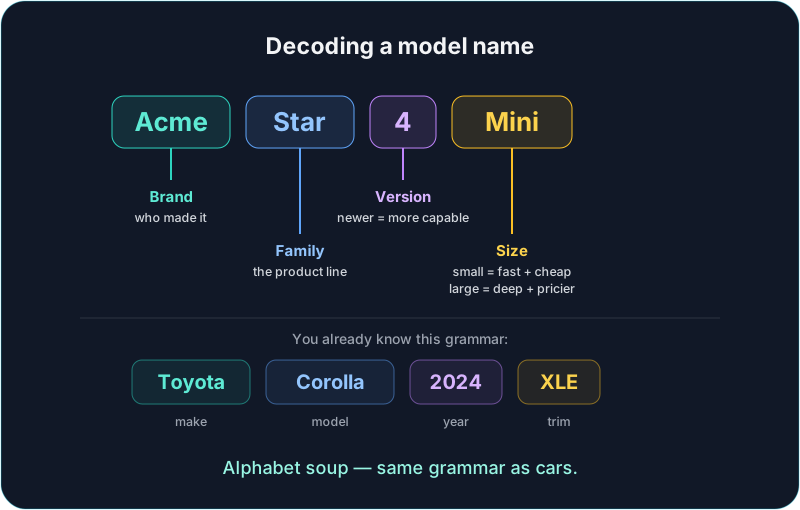
Now the alphabet soup. Here is the secret: model names follow the same grammar as car names. A car is a make, model, year, and trim — Toyota Corolla 2024 XLE. A model name is a brand, family, version, and size:
- Brand — who made it. GPT models come from OpenAI, Claude from Anthropic, Gemini from Google, and so on. Like car makes, each brand has a reputation and a personality.
- Family and version — the product line and its generation. Version numbers work like phone models: newer is usually more capable, and the old one does not stop working overnight.
- Size — the trim level, and the part actually worth learning. Words like nano, mini, flash, and haiku mean small: fast and cheap. Words like pro, opus, and ultra mean big: deeper and pricier. Once you can spot the size word, most of the menu's intimidation evaporates.
The tool rule
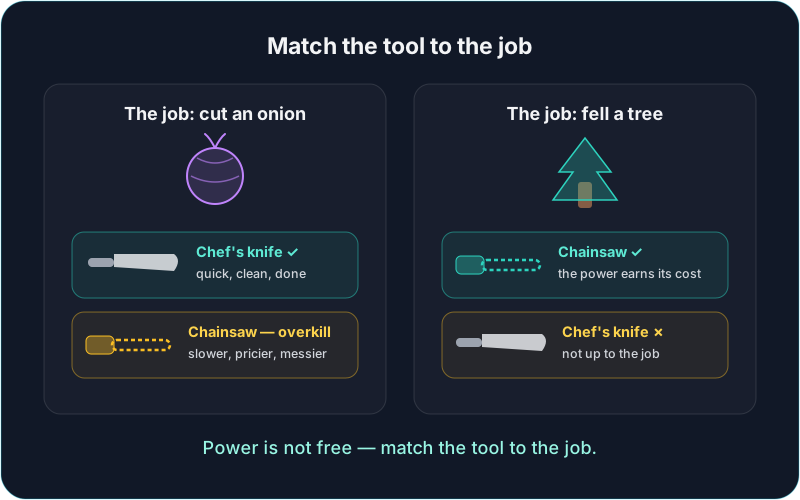
So which size do you pick? One rule covers almost every case: match the tool to the job.
Imagine you need to cut an onion, and you bring a chainsaw. The chainsaw is objectively more powerful — and it just turned an easy job into a difficult, messy one. Meanwhile a chef's knife handles the onion perfectly and would be a silly choice for felling a tree. Power is not the same thing as suitability. More power is not free, either: bigger models answer more slowly and cost more per answer.
The cost side is worth saying plainly. Using a heavy model for a simple question is like hiring five people to do a one-person job — nothing exactly wrong with it, just waste. And money is only the first currency. The second is energy: every AI answer is computation in a real data center running on real electricity, and a heavy model burns many times more of it per answer than a small one. One person's choice barely registers; the same choice multiplied across billions of questions a day is exactly how AI stays — or fails to stay — energy-efficient. Right-sizing is not just thrift. It is the responsible habit.
So the goal for everyday use is what you might call the minimum viable answer: the smallest, fastest model that does the job well. Cheaper for you, lighter on the grid, and — chainsaw, onion — often the better experience anyway.
The one distinction worth learning: reasoning models
Beyond size, there is exactly one category difference worth a beginner's attention. Some models are built to think before they answer. Instead of starting the reply immediately, they first work through the problem privately — breaking it into steps, checking their own logic, sometimes visibly "reasoning" on screen — and only then write the answer.
In Part 1 terms: it is the guesser showing its work instead of blurting the first guess. And it measurably helps on a specific kind of problem — anything with multiple steps where one wrong early move ruins everything after it. Tricky math. Planning a complicated trip with constraints. Untangling a rule with exceptions to the exceptions.
The trade-off is the same as everywhere in this part: thinking takes time and computing, so reasoning models are slower and pricier. Pointing one at "write a birthday message" is chainsaw-for-onion — you will wait longer for an answer a quick model handles beautifully. Save them for the problems with steps.
Same name, different behavior
Here is a puzzle you may have already met: the same model can act noticeably different in two different apps. Same name on the menu, different experience. How?
Because you never talk to a model directly — you talk to an app wrapped around a model, and the wrapper matters. Apps add their own hidden instructions ("be concise," "be warm," "refuse these topics"), their own settings (including how long a reasoning model is allowed to think), and their own extras before your words ever reach the model. Part 4 showed you one tiny example — the app quietly whispering today's date. That whispering happens everywhere, and every app whispers differently.
And one version of this is worth calling out by name: free tiers usually serve the smaller or older models. The free version of an app is generally not running the same model as the paid one. So if you tried AI once, found it disappointing, and quietly gave up — there is a decent chance you were judging the whole field by its smallest free model. It is worth one retry on a current model before writing the technology off.
Open vs. proprietary, in one honest minute
You may also hear that some models are "open source" while others are closed. Here is the plain version.
A model, at the end of all that training, is essentially a giant file of learned numbers — the weights, in the jargon. Everything the crowd of guessers absorbed lives in those numbers. Open models publish that file for anyone to download, inspect, and run on their own machines. Proprietary models keep it locked on the maker's servers; you can talk to the model but never hold it.
Two reasons a non-technical person might care. First, open models are the reason truly private, runs-on-your-own-computer AI exists at all — the "local AI" footnote from Part 5 is built entirely on them. Second, open models keep competitive pressure on everyone's prices, which benefits you even if you never touch one. And one reason you mostly will not care: day to day, the app you use shapes your experience far more than the license behind the model does.
When it actually matters
Honesty requires saying this clearly: for most everyday questions, any current model is fine, and agonizing over the picker is wasted worry. The differences show up at the edges:
- Writing voice. Models genuinely sound different — one may write the way you like and another may grate. For writing tasks, pick by feel, like choosing a radio station.
- Long documents. Models differ in how much they can read at once. If you are handing over a whole contract or a year of notes, the model's reading capacity matters.
- Multi-step problems. The reasoning-model territory above.
- Speed. For quick back-and-forth — the conversational steering from Part 3 — a fast model keeps the rhythm going. Fast beats brilliant when you are iterating.
Outside those edges, the differences are mostly taste.
The bottom line
So which model should you use? The honest answer, and the one nobody selling AI courses will give you: most people should not be hand-picking models at all. The default is fine. Many apps now go further and choose a model automatically per question — small for small, big for big — which is not a downgrade; it is the tool rule applied for you. Conveniently, that is also the energy-efficient outcome. The lazy path and the responsible path are, for once, the same path.
The skill worth keeping is just noticing the exceptions. Something important, complicated, or multi-step? Escalate — the big or reasoning model earns its cost. Something quick and simple? The small, fast model is not "worse." It is correct.
One gap left
That closes out the menu — but there is one honest gap left in this series' picture of AI.
Almost every weakness we have covered has a patch, and the patch is not "a smarter model." Stale restaurant hours, no clock, no calculator, no idea what happened this morning — the fix for all of them is giving the guesser tools: a web search to run, a calculator to press, a page to go read. It is how a machine that only guesses words becomes something that can actually look things up. That is the final part of this series — and the most hopeful one.
Next in the series: how tools make AI more useful — the extensions that patch the exact weaknesses you now know by name, and the things no tool can fix. The series overview has the full roadmap.
Ethyx is in closed testing with an access code today. Everything in this post applies to any AI chat app, not just ours.
You do not need Ethyx — or any particular product — for this series to be useful.