
AI 101 · Part 5 of 7
August 30, 2026 · 11 min read
By David Crush
What happens to what you type?
So far this series has been about the answers: what makes them, what to use them for, how to ask better, and when not to trust them. This part is about the other direction — what happens to the words you send.
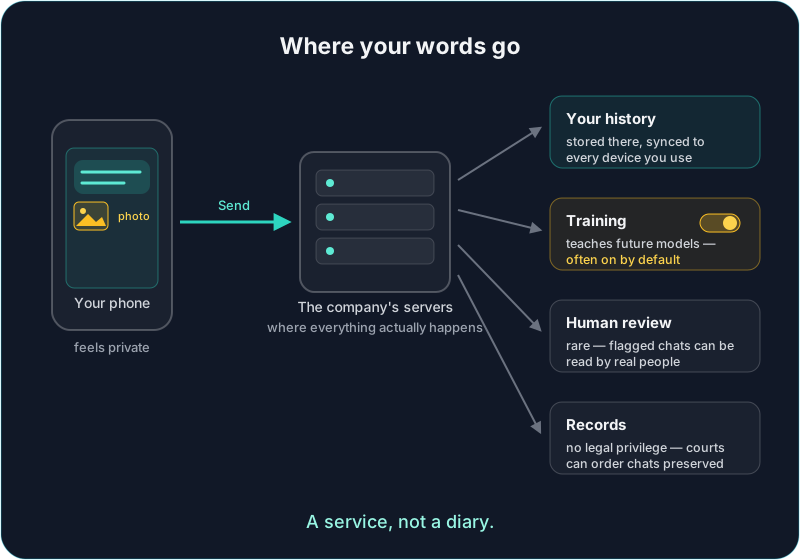
Here is the illusion worth breaking gently: the chat box looks and feels like a private notebook. You type into a quiet little window on your own phone, alone in your kitchen. But the moment you press Send, your words leave your device and travel to a company's computers — and everything the AI seems to "do" happens there, not on your phone. You are not writing in a diary. You are mailing a letter.
(Yes, it is technically possible to run an AI entirely on your own computer, where nothing leaves the house. Today that takes effort and a beefy machine, and the models are weaker — it is not the realistic option for most people yet. So this part covers the way nearly everyone actually uses AI: through an app talking to a server.)
None of this means stop using AI. It means using it the way you use anything else that leaves your hands: knowing where it goes.
The four copies
Once your words arrive at the company's servers, there are four places they can end up. Not hypothetically — these are the standard mechanics of the big chat apps as of this writing.
1. Your history. Your past chats appear on your laptop and your phone, which quietly tells you something: they are not stored on either one. They live on the company's servers so they can follow you between devices. Convenient — and it means a copy of everything you have ever typed exists somewhere other than your home.
2. Training. This is the one most people have never been told. The big consumer apps use your conversations to teach their future models — by default. ChatGPT calls the setting "Improve the model for everyone." Claude asks you to accept "Help improve Claude." Gemini ties it to "Keep Activity." All of them, as of this writing, default to yes — the burden is on you to say no. Two honest footnotes: flipping the switch protects your future chats, not what already went in; and the paid business versions of these apps generally do not train on your data by default — companies negotiated that protection, and it is one you have to flip a switch to get.
3. Human eyes. Conversations flagged by safety systems — and some samples used to check quality — can be read by actual employees or contractors. It is rare, and it is in the fine print of every major app. Worth knowing before you paste something you would not want a stranger at the company reading.
4. Records. A chat with an AI has no special legal protection. What you tell a doctor, lawyer, or therapist is privileged — a court cannot simply demand it. What you tell a chatbot is a business record on a company's servers, and courts can and do order companies to preserve and hand over chats. And "delete" is a request with a clock attached, not a shredder: deleted chats typically linger in backups and safety systems for a window of time (about 30 days is common), and a legal hold can pause deletion entirely.
Photos and files take the same trip
A quick detour, because uploads feel different — you hand the AI a photo, it describes what it sees, and it feels like the photo was glanced at and forgotten.
It was not. Under the hood, the model reads a processed version of your upload — a photo gets turned into patterns of numbers the model reads alongside your words, and a document gets its text pulled out. But that is trivia. What matters is that the service keeps the raw file, same as your text. ChatGPT, for example, saves every file you upload to a permanent library on your account, and its training setting explicitly covers uploaded files and images — not just what you type.
Uploads actually deserve more care than text, for two reasons:
- A photo of a document is the unredacted everything. When you type a question about a confusing bill, you naturally leave things out. A photo of the bill leaves nothing out: full account number, home address, barcode.
- Camera photos carry invisible baggage. A photo from your phone's camera can include hidden metadata — potentially the exact location and time it was taken. Screenshots do not have this, which is one small reason to prefer a cropped screenshot over a camera photo.
The stranger now has a notebook
Part 1 gave you the confident stranger at the party — brilliant, well-read, occasionally wrong. Time to complete the picture: the stranger writes down everything you say and hands the notes to their employer.
Notice what this changes and what it does not. It changes nothing about asking for dinner ideas, having a paragraph untangled, or the 2am worry-sorting from Part 2 — there is nothing in those chats worth protecting. It changes everything about pasting your tax return "just to have it explained." Same stranger, same conversation, same little chat box. The difference is entirely in what you put in it.
What never goes in the box
The short, hard list. Not judgment calls — these stay out, always:
- Passwords, PINs, and recovery codes. No legitimate reason ever. The AI does not need your password to help you, and now it exists in a log.
- Full account, card, and ID numbers. The AI can explain the bill without the barcode. Round the numbers, drop the identifiers — the advice comes back identical.
- Other people's private information. Your friend's medical situation, your coworker's crisis. It is not yours to send to a server, even with good intentions. You are a custodian of what people trust you with.
- Work-confidential material on a personal app. Client lists, unreleased plans, anyone's records. Beyond the courtesy, many employers now have explicit policies about this — people have been fired for it.
What actually deserves your worry
Here is where this post earns its keep, because most privacy advice fails by treating every risk as a five-alarm fire. Ranked honestly, most realistic first:
- Your account is the soft target. Everything you have ever typed sits one password behind a login page. Nobody needs to breach a data center — guessing your reused password is enough. A strong, unique password plus a second factor (the app texts or prompts you to confirm it is really you) is the single highest-value privacy move in this entire post. Nothing else comes close.
- The middleman app. Not every "AI chat" app is what it appears. Plenty are thin wrappers: your words go to the wrapper company first, then on to the real AI — and the wrapper sees everything, under whatever privacy policy it felt like writing. Stick to apps from names you can look in the eye.
- Share links are publications. That "share this conversation" button creates a link, and links travel. Shared AI chats have ended up indexed by search engines before — real people's conversations, findable by anyone. Treat sharing a chat like posting it.
- Memory features accumulate. Some apps now remember details across conversations to personalize answers. Genuinely useful — and it means a quiet profile of you is building up in one more place. It is optional; worth knowing where its switch is.
- Your chat resurfacing from training data. The one everyone fears ranks last. Models learn patterns from millions of conversations, not transcripts to replay; your specific chat reappearing in someone else's answer is a real research topic but a remote everyday risk. The realistic cost of the training default is subtler — your words simply become part of a company's raw material, indefinitely, without you ever having really agreed.
The nickname trick
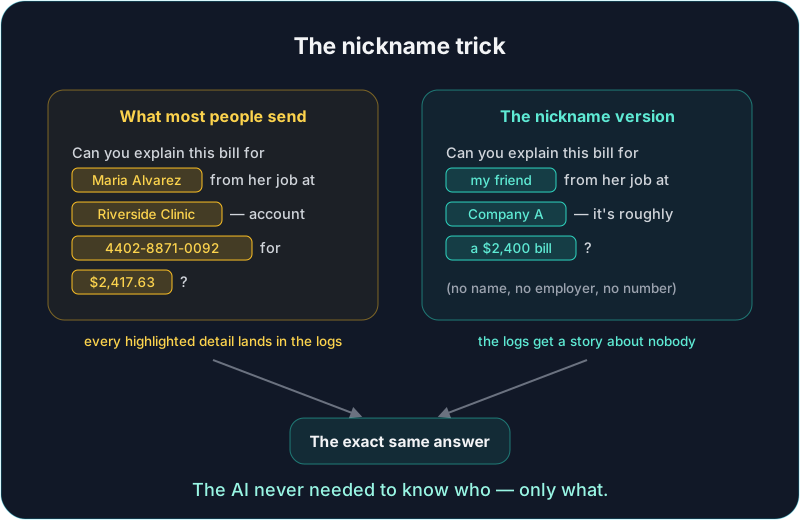
Now the habit that gives you most of the privacy without giving up the help — the one we use daily in our own house: swap real identifiers for stand-ins before you send.
"My friend" instead of her name. "Company A" instead of your employer. "A $2,400 hospital bill" instead of the account number and the exact balance. "Someone I manage" instead of a name a coworker could recognize.
Here is why this works so well, and it follows straight from Part 3: the AI never needed to know who — it only needed to know what. The advice for "my friend who takes blood thinners" is word-for-word the advice for her by name. You give up nothing. The answer is just as good, and what lands in every copy on that diagram above is a story about nobody.
The upload version of the same habit: strip before you send. Crop the screenshot to the confusing paragraph. Cover the account number with your thumb before photographing the letter. The AI can explain the scary part of the bill without the barcode — and, from earlier, a cropped screenshot also sheds the hidden location data a camera photo can carry.
The five-minute tune-up
One sitting, once, on each AI app you use:
- Find the training setting and set it the way you want. Look for "Improve the model for everyone" (ChatGPT), "Help improve Claude" (Claude), or "Keep Activity" (Gemini). Names may shift over time; searching the app's settings for "improve" or "activity" usually lands there.
- Turn on the second factor. Highest-value five minutes on this list.
- Learn where the temporary chat is. Most apps have an incognito-style mode that skips history and training. Right for sensitive one-offs — just remember even temporary chats are typically kept for a safety window before deletion.
- Delete what you would not want resurfacing — knowing deletion is a request with a clock, not a shredder. Still worth doing.
- Think twice before sharing links, and check the memory setting if your app has one.
Who owns what it writes back?
One last thing, about the opposite direction — the words the AI sends you. Most people assume that what the AI writes for them belongs to them, like anything else they made. Legally, it is stranger than that.
In the United States, as of this writing, something generated purely by AI cannot be copyrighted at all. Copyright requires a human author, and the Copyright Office has been clear that typing a prompt — even a long, careful one — does not make you the author of what comes back. Their comparison: describing a painting to an artist does not make you its painter. So an AI-drafted logo, jingle, or book chapter used exactly as-is may belong to no one — which means someone else could legally reuse it.
The flip side is better news, and it happens to be the advice this series keeps giving anyway: what you change, you can own. Your edits, your additions, your arrangement — human contributions are protectable. Rework the draft in your own voice and you are not just making it better; you own the parts you shaped.
(Law in motion, US-specific, and not legal advice — other countries answer this differently, and the courts are still drawing the lines. The takeaway is simply: do not assume raw AI output is yours alone.)
A service, not a diary
Put it all together and the calibrated summary is short: you do not need to whisper around AI — you need to know it is a service, not a diary.
Words go in: they are kept, sometimes learned from, occasionally read, and legally reachable — so send the situation, not the identifiers. Words come out: they are useful, and raw output is not really yours until you make it yours — so rework what matters. Neither fact is a scandal. Both are just how the tool works, and nobody hands you the manual.
You now have the manual. The training toggle, the second factor, the nickname trick, the crop — none of it costs money and none of it makes the answers worse. That is the difference between using AI fearfully and using it deliberately.
Next in the series: so many models, so many strange names — does it matter which one you use? The series overview has the full roadmap.
Ethyx is in closed testing with an access code today. Everything in this post applies to any AI chat app, not just ours.
You do not need Ethyx — or any particular product — for this series to be useful.